
Drag and Drop Questions
Here you will find answers to drag and drop questions in ICND 1 exam
Question 1:
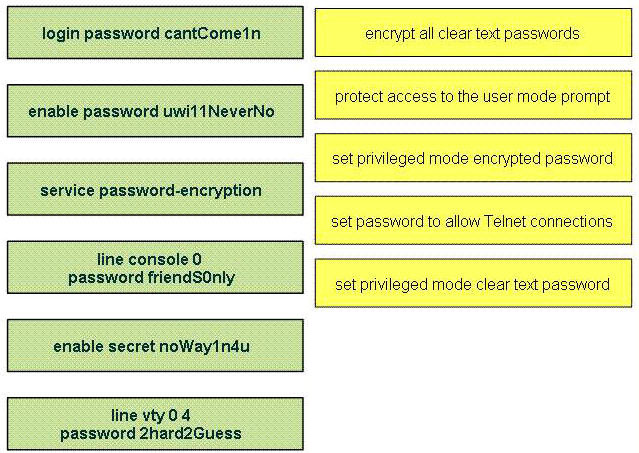
Drag the appropriate command on the left to the configuration task it accomplishes (not all options are used)
Answer:
1) service password-encryption
2) line console 0
password friendS0nly
3) enable secret noWay1n4u
4) line vty 0 4
password 2hard2Guess
5) enable password uwi11NeverNo
Question 2:
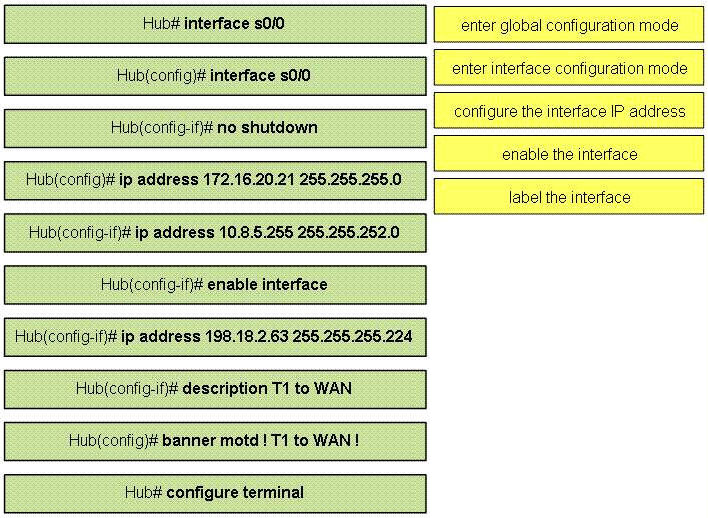
Construct the command sequence to configure an IP address on a serial interface (not all options are used)
Answer:
1) Hub# configure terminal
2) Hub(config)# interface s0/0
3) Hub(config-if)# ip address 10.8.5.255 255.255.252.0
4) Hub(config-if)# no shutdown
5) Hub(config-if)# description T1 to WAN
Explanation:
One thing interesting in the answers is that the command ip address “10.8.5.255 255.255.252.0” (answer 3) is correct because 10.8.5.255 255.255.255.0 is not a broadcast address. Let’s analyze this case a bit closer:
Increment: 4 for the third octet (255.255.252.0 = 1111 1111.1111 1111.1111 1100.0000 0000)
First subnetwork range: 10.8.0.0 to 10.8.3.255
Second subnet range: 10.8.4.0 to 10.8.7.255
…
Therefore 10.8.3.255 and 10.8.7.255 are the broadcast addresses but not 10.8.5.255. So we can assign this address to s0/0 interface.
( Notice that the command Hub(config)# ip address 172.16.20.21 255.255.255.0 is only correct only if it is in interface mode, which is Hub(config-if)# )
Question 3:
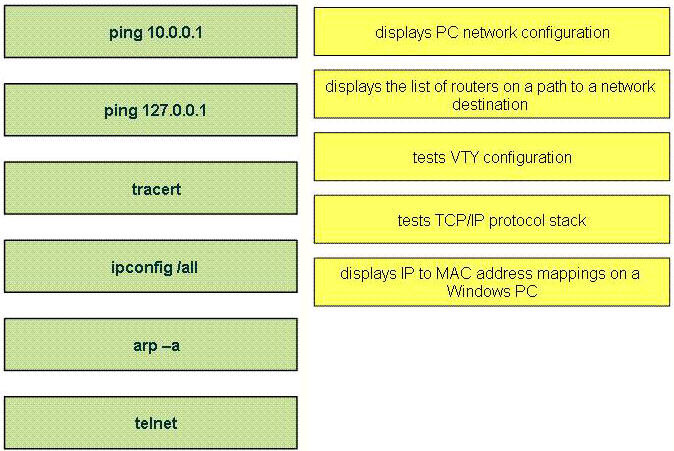
Drag the commands on the left to the appropriate functions on the right (Not all options are used)
Answer:
1) ipconfig /all
2) tracert
3) telnet
4) ping 127.0.0.1
5) arp -a

I am going to take the ICND1, what questions on this site are included?
Are the only questions the ones listed under 640-822 or can any ccna question be on the ICND1?
for question 3,what is the difference between ping 127.0.01 and 10.0.0.1??
why do you use ping 127.0.0.1 instead of the other one???
As is in the answer. Tests the TCP/IP protocol stack. It shows if you computer have at least TCP/IP successfully installed there.
fnm@localhost:~$ ping -c 4 127.0.0.7
PING 127.0.0.7 (127.0.0.7) 56(84) bytes of data.
64 bytes from 127.0.0.7: icmp_req=1 ttl=64 time=0.048 ms
64 bytes from 127.0.0.7: icmp_req=2 ttl=64 time=0.041 ms
64 bytes from 127.0.0.7: icmp_req=3 ttl=64 time=0.043 ms
64 bytes from 127.0.0.7: icmp_req=4 ttl=64 time=0.044 ms
— 127.0.0.7 ping statistics —
4 packets transmitted, 4 received, 0% packet loss, time 2997ms
rtt min/avg/max/mdev = 0.041/0.044/0.048/0.002 ms
fnm@localhost:~$
If your PC is able to ping it, it may reach the 10.0.0.1 IP address from your or other network.
HTH
Hi… for question no. 2, y is ip address 198.18.2.63 not possible?
Okay.Got it!It’s a broadcast address on the second subnet.Right?
@Mits check subnet mask carefully it is block size of 32
so it is broadcast address .
guys ive a question what do you prefer me i ve took my icnd 1 exam and failed 790 shall i try icnd 1 again or go for the ccna composite ?
for 9tut a friend told me to bad because he told me after i took my exam here are some questions that ive seen in icnd 1 now im lite bit confused
Drag and Drops that were not in 9tut yet…I think…
1. DHCP Process : Discover –> Offer –> Request –> Acknowelege (DORA)
2. WAN types : Frame Relay, Leased Line, ATM, PTSN(?) –> Point-to-Point, Circuit Switch, Cell..etc…
But get a grip on WAN…
great site – great explanations but understand the concepts first – buy the book- read them – then come to this site to see if you really understand the material
Had a drag and drop that pertained to cell switching, packet switching, circut switching… Didn’t see it on this site.. ANy comments about this would be welcome.
maybe you are referrring to the questions below:
Circuit Switching- PSTN
Packet Switching- Frame Realy
Cell Switching- ATM
Lease Line- point to point
Passed the ICND1 test today with a 874. Just trying to help out others as this site helped me.
I had all three of these drag and drops as well as the DHCP “DORA”.
Hello, Passed today with a 925. Onto the next one now. I had a couple sims that were on here but had a drag and drop that I did’t see on here. It involved the DHCP process. You had four choices and had to put them in order. The choices were
DHCPDiscover
DHPCACK
DHCPDiscover
DHCPOffer
I also had another drag and drop that mapped applications to descriptions
Email – Send messages back and forth
Collaboration – multiple users updating simultaneously
Database – a collectio of records stored in a central location
Web Browser – Application for internet servers.
Anyways, it was something along those line.
For Study I used
Cisco Press 640-822 Wendell Odem
Pass4sure practice exams
Packet Tracer – Extremely useful
Of Course, this website – Very useful as well.
Sorry it was DHCPrequest
The RACADM.EXE utility provides a scriptable interface that allows you to locally or remotely configure your remote access controller RAC … Using the RACADM.EXE utility you can enter command line options to configure RAC properties. You can also use the RACADM.EXE utility to write scripts that will automatically configure multiple RACs.
Bobo…. you have listed wrong order.
correct order is
1) DHCP discover
2) DHCP Offer
3) DHCP request
4) DHCP pack
Do you get points for answering some of the Drag and Drops questions correct? Or does it count the question as one?
As said, read the books first, then come to this site. CBT Nuggets and CCNA by Sybex/Lammle is great. But FYI
Had a drag and drop that wasn’t listed here that caught me by surprise and had to think about for a while.
Something like match the WAN type to the technology/method. Haven’t checked if these answers are correct but I think this is what I did.
ATM > Multiplexing
PSTN > Circuit
Frame Relay > Packet
Leased Line or PPP or something > ?
Good luck.
there you go…
Point to Point – Lease Line
Circuit Switched – PSTN
Packet Switched – Frame relay
Cell Switched – ATM
What are unicast addresses
Passed today from riyadh/ksa with 962/1000 missed 2 qts,thanks a tons to 9tut.net,ExamCollection.com,CBT Nuggets by Jeremy Cioara,ICND Modules(1 to 6) from cisco.com and special thanks to Cisco.TestKing.640-822.v2011-04-18.by.AttaullahShahid.513q.vce (Examcollection.com).
Important Advice Subnet Subnet Subnet learn subnetting with practise and try to solve the subnet qts just by looking at the netmask.Now Looking forward to ICND2.
Above Qt1 was there on my Test
Hello Guys
Could you please help with my CCNA exams,
any update with new drag and drop, Subnetting
thanks
Farid Amiree
I passed tonight with 975/1000. All of these questions were there. Almost the same ones.
ChubbyBaby – you ping 127.0.0.1 (it includes a range of addresses including the 128.0.0.0 network) because it is a loopback address, the other is a Class A private address. Loopback addresses are used for testing
Unicast addresses are single IP addresses assigned to a host or a device
mistake – didn’t mean to include 128 network
Passed ICND1 today. I had 2 of these drag/drop on it. Thanks 9tut. I will donate in a few minutes. I appreciate the site.
Passed ICND1 today with 962…..I didn’t have any of these today. I had the Drag and Drop for the order of DHCP (D.O.R.A)
Studied with:
Odom ICND1 Book
Todd Lamle CCNA book
Chris Bryant (thebryantadvantage.com)
I got DORA.
DNS, WEB Browser, DHCP, database, collection
Passed ICND1 on Aug 26th, I had DNS, Web Browser, DHCP, database and collaboration, and order of DHCP.
DHCP/DORA
Collaboration/email/ect
Command Seq
Very helpful to know
Guys the drag and drop feature doesn’t work for me on this site. I’m running Firefox and tried explorer too. Any idea why? When I click and drag a no entry/invalid sign appears.
@necrosys
those are just images on this site.
if you want to practice on drag and drops then try here:
http://www.ciscovce.com
Almost all of these drag-n-drops were on my exam yesterday. I got the prize package for sure. Just don’t memorize know why it is happening.
Good comment…you have to know the concept!
Q1 has an issue with the first part (login password cantCome1n). User mode implies access through con, vty, aux etc. When configuring any of these, the syntax is:
line x (e.g. line con 0 OR line vty 0 4)
password cisco
login
You must enter the password first, followed by the word “login” on a separate line.
Can someone update that diagram to reflect this?
In answer to Chubbybaby’s question about the the difference between ping 127.0.01 and 10.0.0.1:
127.0.0.1 is known as the loopback address. Pinging the loopback address is the first thing you should do if you can’t access anything on your network. This verifies TCP/IP is loaded and functioning problem. From there, you’re next step would be to ping your local IP address. Then, you’re gateway address. Those should always be your first three steps in troubleshooting connectivity issues.
To add to my previous comment: If you’re on a Windows pc, open a command prompt (i.e. a DOS prompt) and enter ipconfig /all to determine you’re local IP address. Then, try to ping your local IP. If you can ping your local IP, that tells you your NIC is functioning.
@hikerdude
that’s in the study guide. in real world you will do a “ping http://www.google.com -t” at first because you don’t care how far the packet goes, you care only if it gets to the internet. if it doesn’t then you start troubleshooting.
still, for the exam you are 100% correct. ping loopback first, pc’s IP second, default gateway third
@xallax
I agree. I was just sticking to the basics that might be asked on the ICND1. But yes, real world, you “go for broke” first and try to ping your destination first, then step back from there (i.e. if you can’t ping the destination you’re trying to reach, see if you can ping ANYTHING outside your LAN. If you can’t, try and ping your default gateway, then your nic, then loopback.
The cisco answer is a waste of time. Go for broke. If it works, you’re done, if not then backup. Except for the test! One thing to note though. Pinging 127.0.0.1 doesn’t test your NIC completely. It doesn’t send out any signal (check your activity lights on the card). It only checks your protocol stack is loaded and the code is running without error. Again no signal leaves your windows machine.
Good point Hughie5Woody. Small but important detail.
Hi 9tut,
Cleared ICND1 this morning with an 874/1000 with 20 minutes to spare. Thought I did better but i’m not complaining, chuffed to clear it 1st time. It was easier than I anticipated, put the hours in studying and you will be fine. This was my first question on the exam. You have pretty much nailed it. show running-config on both devices and answer the 4 questions. The questions above are very close to what was asked. look for clear-text passwords, passwords on the console and vty lines, weak username and password command (cisco) , login local, the number of telnet sessions allowed, is a password configured for Telnet, exec-timeout, will it allow telnet and ssh etc.
I would like to thank 9tut / xallax and the everyone else for all the time you have put into this site. This site helped me pass as most of my questions were on the site!!! From what I remember, some of the questions I got were as follows:
-Security Testlet above, all the information is displayed in the running config, just go through the options given in the 4 questions
-Drag and Drop – DHCP (DORA) / Drag and Drop # 2 (file management – copy flash tftp etc) / DNS,ARP,DHCP (know what they do) / WAN technologies (Frame Relay – Packet switched , ATM – cell switched etc)
-Implementation SIM using show cdp neighbors command / show IP interface brief
-Show configuration SIM (show run / startup command disabled)
-Transport Layer fundamentals – 3 way handshake, TCP/UDP, Flow control
-Protocol process through the layers of TCP/IP stack sending an email using HTTP (SMTP at app layer – TCP at Transport layer – IP at Network layer – ARP at Network access layer)
-Encapsulation (HDLC) – default on Cisco devices
-Troubleshooting connectivity issues – when to use a X-over cable and Straight-through, spot incorrect cable in a diagram / duplex mismatch etc.
-Service Password Encryption and what it does
-What switches do when they get a packet with a destination MAC not in CAM table – Flood
-Indicator lights on a switch – Flashing green, Green etc (what each means – Full/Half duplex, network activity etc)
-Port-security, Mac-address sticky command, know what it does
-know the packet delivery process for the sending across the LAN and WAN (what MAC is used where etc) / ARP
-RIP (what happens when you enter router rip command – defaults to version 1)
-implementing a Static Route to default-gateway 0.0.0.0
-Subnetting,Subnetting,Subnetting (I had about 7 or 8 questions relating to Subnetting, valid host ranges, broadcast / network address etc. Practice and you will be fine. subnettingquestions.org I found really helpful. )
Hope this helps. Remember, do not memorize each question on this site, know the concepts and why they happen and you will be fine. I used CBTnuggets, Cisco Press Book, Packet tracer (I didn’t create any funky topologies, I just used it for working on the IOS entering commands) and subnettingquestions.org.
Onto ICND2 in the new year. Good luck!!!
Hi All, The above comment is copied from the Security Testlet tab. 1st paragraph relates to the Security testlet question.
Thank you so much 9tut for your website. It is helping me a lot preparing for my exam on the 23rd of this month.
IrishDave, I like your outline. it is very useful.
Got q1 and q2. Cleared them both. Thanks to 9tut, you’re the best. Onto ICND2 now.
Glad to know DORA. The key to pass the exam is go through examcollection.com, go through 9tut and all the comments. I was so thankful that I took the time to go through each and every single comments on 9tut on the ICND1 topics. Most of the answers are from the comments. Thanks to each and everyone of you who had contibuted your time and effort. Thank you all! Onto ICND2 now.
I love you ALL!!!
Question 3, DORA and Point to Point – Lease Line
Circuit Switched – PSTN
Packet Switched – Frame relay
Cell Switched – ATM
included in yesterday ICND1 exam
Hi! What’s about of DORA question? Order only ( D->O->R->A)? But I must to point where unicast frame and broadcast frame? I’m going to take 640-822 this friday.
@kira
discover – broadcast
offer – unicast
request – broadcast
accept – unicast
dora/bubu 🙂
@xallax
Thanks, but why request is broadcast?
W.Odom icnd1 page 124-125. Only first two messages is a Broadcast.
“… why the “…the first two messages in the DHCP are broadcast messages…” refers to Network Layer IP broadcast messages (destination IP address of 255.255.255.255). Then “…only the first message (the Discover message) is a LAN Broadcast…” because only the Discover packet’s frame had the Ethernet destination address of FF:FF:FF:FF:FF:FF (therefore a LAN broadcast) and the Offer packet’s frame had the Ethernet destination address of PC:MA:CA:DD:RR:SS (therefore a LAN unicast). ”
So i worry with this question..
Passed today!! 937. It’s very easy exam! Good luck!!!
THANKS!!!!!!!!!!
Thanks for all!!
Great site!!!! 9tut – FOREVER!!!!!!!!!!!
1) DHCP discover
2) DHCP Offer
3) DHCP request
4) DHCP pack
DORA and Point to Point – Lease Line
Circuit Switched – PSTN
Packet Switched – Frame relay
Cell Switched – ATM
goodluck
Passed today (23rd March) with 936. I got the DHCP and type of network drag and drop questions. Both simple.
Got question #3 today..
Got 2 drag and drop Q’s on the test today, which i found in the comments:
Q1
Frame relay = packet switching
ATM = cell switching
PPP = leased line
PSTN = circuit switching
Q2 was about DNS, DHCP, TFTP, FTP, SNMP.
I got Dora to BUT I listed them this way
ack
request
offer
Discover
Starting from the bottom first eg discover 1st just as the physical layer is the 1st layer of the OSI model at the bottom.
I scored 950 but wondered if this would have been marked as correct ad it didn’t specify bottom to top or vice versa.
@Mrmicp
The proper order for a DHCP request is discover/offer/request/acknowledge. Listing them the way you did isn’t the correct order when a PC uses a DHCP. Listing them in the order you did would most likely result in the answer being marked incorrect.
Passed test today 925/1000
I had some WAN drag and drops that were not on this 9tut. I want to thank 9tut , because this web site helped me so much!!!!
kenape die xley drag and drop ?
time kasih 9tutut…
i got this lab in exam yesterday
passed today…got que 1
Thnx 9tut…. i just passed ICND1… you helped me alot.. there was 1 new drag & drop question … as long as i remember … there were some slots on the left .. one was, DNS, one was ATM, one was, PTSN, one was, ARP and DHCP … and aususal emptly slots with the description on the right side ….
good morning, please the friends, be able to decrir exam icnd1? questionaires on what modulates? is this also ospf, eigrp, and nat? for icnd1? svp j am confused help me, j ‘ai finished the fornation ccna, then j must take my exam in 2 edges icnd1 then 2, my icnd1 exam is the next week;halp me please
guez_carine@yahoo.fr
I failed Icdn1 today, 724, I think one of the questions was wrong, is it possible ?
another question is how cisco evaluate the test, it was just 1 wlan question and it has 100% score, all the subject has the same vlaue?
@ xallax
February 22nd, 2012
“@kira
discover – broadcast
offer – unicast
request – broadcast
accept – unicast
dora/bubu :)”
Correction::
Accept is in the 3rd step where PC is accepting the Offered IP address by Requesting back to the DHCP server to assign it the Offered IP address.
The 4th step is Acknowledgement from the DHCP server that your accepted IP address has been assigned to the PC.
==========================================================
A useful website for Bank Exams PO preparation:: http://www.bankingexams.com/
Q2 and 3 on my exam 8/31.
@Vinds
You are right but the last one is Ack for Acknowledgement. The way to remember this is DORA is Discover, Offer, Request and Ack.
Discover is the only one that broadcast, all the other three are unicast.
@robert @ruth
dhcpdiscover and dhcprequest are broadcasts as the client doesnt have an IP address and will try to contact all dhcp servers on both occasions. discover – to let all servers know there’s a client that needs service; request – to let all servers know that a particular server was chosen for the service
dhcpoffer and dhcpack (my bad above, it’s not accept) are unicasts because the frames from the server are directed towards the client (directly or via routers)
Had questions 2 and 3. Passed 9/23/12 with a 974. This website is awesome and is a great representation of whats on the test. I had the DORA drag and drop, and also the WAN protocol DAD. The security testlet was on there. Chose banner as part of my answers and got 100% in that area. I had lots of subnetting questions, so if you are not comfortable with subnetting, practice. For studying I used this site, cisco (for the subnetting game, and also went through their review questions), and attended a CCNA course at a certified cisco learning partner. Also had the implementation drag and drop. thanks 9tut, on to ICND2. Good luck everyone.
DORA drap and drop appeared today.
Thanks.
took my test yesterday got 782 just missed it . i had the same drag n drop :
Frame relay = packet switching
ATM = cell switching
PPP = leased line
PSTN = circuit switching
and caught me by surprise as well . Maybe 9tut can add it the rest of the Q’s in here so others dont run into the same thing I did 🙂 I will be taking my test again in 1 week wish me luck
I am totally having some unfortunate luck with all of my Cisco attempts for 640-802 and then stepping down to doing the two part 640-822 and 640-166. On my last two failed attempts with the 802 exam, I failed both exams by 10 points which caused me to go hysterical. When I decided to go for the 640-822 test, I studied hard for another 3 weeks with all sorts of tools provided:
– Leadpass
– CBT Nuggets
– Testout
– Boson 7.0 Netsim
– ITU
– Cisco Press ICND1 book by Wendell Odom
– Cisco Packet Tracer
– 9tut
– ExamCollection
– VCE
– subnettingquestions.org
and I still ended up failing for with a 775/1000. I was for sure that I passed the exam when I was killing all of my practice material. I definitely do not know what is going on and this is extremely disturbing. I keep seeing others with great success stories, and I’m trying to reach that pinnacle also to relay my experiences, but damn, I’m in a hole I can’t get out of. Can anyone out there feed me some of the latest dumps for the ICND1 exam. I would definitely appreciate this as I’m trying to be a family member in the Cisco world.
I can be reached easily at cehiem@yahoo.com…
Hi,
Thanks 9TUT, just passed my ICND1 with 899 and 23 minutes to spare. The simulations on your page is very valid, I got all the LabSim simulations. THANKS!!!
Got the PSTN, leased line, ATM and frame relay along with a drag and drop for Transport layer protocols.
And yes DORA as well. lol
Answer to question 1 is not very clear, Does anyone has an answer for q1 in a clearer format until 9tut fixes it?
The tool doesn’t work with Windows 8, IE10.
@ Reader
The questions are on the right. So, going from top to bottom number those out and match them to the answers that 9 tut listed out. Pretty simple.
This website is really awesome.This website gives me hope.I cant figure it out that how to say thanks to 9tute.God bless you 9tute.Cheers!
hi there i need some advice
am IT train and am looking to pass the ccna exam
just want to know the best way to pass
plz look forward to heard from you ..
@Jan.. you can say thanks by donating 🙂 after i pass this baby i will donate!
FINALLY PASSED! 812/804. Study examcollection dumps & 9tut.
Q1 and 2 was in the exam today
thanks 3dawg im a do the same thing to pass wish me luck
@3dawg
do you have the latest dumps…
plz share with me if u have….
thanx in Advance
my email: khan_nasir45@yahoo.com
Took ICND 1 as a bet for co worker. I’ve been a network engineer for over 6 years. Sometimes you have to go back to the basics to see if you still got it lol. Passed my ICND 1. 890/1000. You need a 804 to pass. The security Testlet was on my exam along with the drag and drop items. One drag and drop item that is not on 9tut is ATM-Cell Switched PSTN-Circuit switched Frame-Packet switched Leased Line- Point to Point. Study Materials were Todd Lammle CCNA videos 6th edition and 9tut only. Good Luck.
WHINERS asking for dumps! Just study what 9tut has posted for you here, until you understand WHY it works! You will NEVER SUCCEED in industry by using dumps, in THE REAL WORLD, you have to know WHY things work!
Gona take my test in Next few days 🙂 Hope this website would help.
SKY, let me know how it goes, I am taking the test on the 27th, think I am the last one taking it!
im taking mine last day…hope all is well…