
RIPv2 SIM
Question
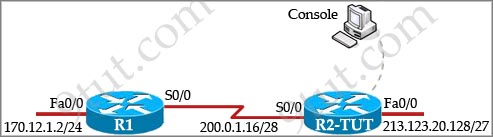
TUT Company recently installed a new router in their office. Complete the network installation by performing the initial router configurations and configuring RIPv2 routing using the router command line interface (CLI) on the R2-TUT.
Name of the router is R2-TUT
Enable-secret password is Sec@ret
The password to access user EXEC mode using the console is Sec@ret2
The password to allow telnet access to the router is Sec@ret3
IPV4 addresses must be configured as follows:
Ethernet network 213.123.20.128/27 – router has last assignable host address in subnet
Serial network is 200.0.1.16/28 – router has last assignable host address in the subnet. Interfaces should be enabled.
Router protocol is RIPv2
Answer and Explanation
1) Name the router:
Router>enable
Router#configure terminal
Router(config)#hostname R2-TUT
2) Set secret password:
R2-TUT(config)# enable secret Sec@ret
3) Set password for the console:
R2-TUT(config)#line console 0
R2-TUT(config-line)#password Sec@ret2
R2-TUT(config-line)#login
R2-TUT(config-line)#exit
4) Set the Telnet password:
R2-TUT(config)#line vty 0 4
R2-TUT(config-line)#password Sec@ret3
R2-TUT(config-line)#login
R2-TUT(config-line)#exit
5) Assign IP address for Ethernet interface (Fa0/0):
The Ethernet network 213.123.20.128/27 has:
Increment:32 (/27 = 255.255.255.224 or 1111 1111.1111 1111.1111 1111.1110 0000)
Network address: 213.123.20.128
Broadcast address: 213.123.20.159 (because 128 + 32 – 1 = 159)
Therefore the last assignable host address in this subnet is 213.123.20.158 and we will assign it to Fa0/0 interface with these commands:
R2-TUT(config)# interface fa0/0
R2-TUT(config-if)#ip address 213.123.20.158 255.255.255.224
R2-TUT(config-if)#no shutdown
R2-TUT(config-if)#exit
6) Assign IP address for Serial interface (S0/0):
Serial network 200.0.1.16/28 has:
Increment:16 (/28 = 255.255.255.240 or 1111 1111.1111 1111.1111 1111.1111 0000)
Network address: 200.0.1.16
Broadcast address: 200.0.1.31 (because 16 + 16 – 1 = 31)
So the last assignable host address in this subnet is 200.0.1.30. Finally we assign it to s0/0/0 interface:
R2-TUT(config)# interface s0/0/0
R2-TUT(config-if)#ip address 200.0.1.30 255.255.255.240
R2-TUT(config-if)#no shutdown
R2-TUT(config-if)#exit
7) Configure RIP v2 routing protocol:
R2-TUT(config)#router rip
R2-TUT(config-router)#version 2
R2-TUT(config-router)#network 213.123.20.0
R2-TUT(config-router)#network 200.0.1.0
R2-TUT(config-router)#end
R2-TUT#copy running-config startup-config
Note:
+ We should use classful networks (213.123.20.0 & 200.0.1.0) when configuring RIP. If we use detailed networks (213.123.20.128 & 200.0.1.16) the router will automatically convert them into classful networks.
+ There is no discontiguous network in this case so we don’t need to use “no auto-summary” command for RIP.

Hello,
I will give ICND1 in next month. Can anyone please help me by giving the pdf of recent version of “CCENT/CCNA ICND1 100-101 Official Cert Guide”,2013? I have completed the Cisco networking academy program course 3 years ago. I forgot all things. Will this guide be ok?
For configuring lab what materials I have to follow? Is there any pdf manual from where I will get all knowledge about configuring all kinds of networking devices that means for “Routing and Switching-CCNA?
Thanks
is RIP still being tested ?
Hi just passed the exam last week but I didnt see any RIP and in my knowledge RIP is not tackled at icnd1.
Taking my ICND1 tommorow at 11!
don’t worry about RIP & RIPv2 anymore. its obsolete and won’t be on any future exams
can any1 please send me dumps for icnd1 & icnd2 {email not allowed} thanx in advance
i writting icnd 1 on the 11th i am asking for dumps {email not allowed}
Hello,
it’s a very very very useful website for ICND1 & ICND2.
fantastic absolute fantastic.
i really appreciate to the owner of this website.
Thank you sooooooo much sir.
can anyone upload question for icnd1 February 2016.
please………….
.
……..
.
……….
i am taking my icnd1 exam in june 2016
which topic can i focus much on
WHY this RIP on exam?
Or is this still on exam, really?
jknkjn
why I can’t see questions ? only word “question” and no question at all
You have to pay $9 to have full access to the material. Don’t be a cheapo…. It is well worth it.
Please mention no-auto summary because networks are classless..
@CCNA Academy: There is no discontiguous network in this case so we don’t need to use “no auto-summary” command.
hi admn thyz a new simulation in 105 icnd1…which everyone in my class failed
‘it has two server and 3routers how do we answer this particular topology?????” I WROTE MY ICND1 LAST WEEK I GOT 813 PASSMARK IS 832.Soo I rebook for next week plz help me wth new updated vce or pdf dump specially focusing on simulation only if possible plz m re wrerritng next week on Thursday please anyone help my email sjmathole8atgmaildotcom please please?
@sello south africa: Could you please check if this is the sim you mentioned: https://www.9tut.net/icnd2/icnd2-labsim/gre-multilink-sim
Lastly! The long days of look for some decent information regarding %BT% accomplished!
Here I came across a few things I want. May well I personally
use this informative article as a general source in my upcoming critique Vera?
guys which labsim for icnd1 …..help mii guys
Do not listen to FooF’s comment “don’t worry about RIP & RIPv2 anymore. its obsolete and won’t be on any future exams”. If you look at the current exam objectives, they explicitly state that you need to know how to configure IPv4 RIPv2. Please look up the exam objectives before you give uneducated misleading information.
What am I doing wrong? What is still field? I can not reach the network via HostA (213.123.20.157/27) to HostB (200.0.1.29/28). What have I forgotten? Here is my configuration.
version 12.4
no service timestamps log datetime msec
no service timestamps debug datetime msec
no service password-encryption
!
hostname R2-TUT
!
!
!
enable secret 5 $1$mERr$u7OLWsMeJb4BZBY.5Nqst1
!
!
!
!
ip cef
no ipv6 cef
!
!
!
!
!
!
!
!
!
spanning-tree mode pvst
!
!
!
!
!
!
interface FastEthernet0/0
ip address 213.123.20.158 255.255.255.224
duplex auto
speed auto
!
interface FastEthernet0/1
ip address 200.0.1.30 255.255.255.240
duplex auto
speed auto
!
interface Vlan1
no ip address
shutdown
!
router rip
version 2
network 200.0.1.0
network 213.123.20.0
!
ip classless
!
ip flow-export version 9
!
!
!
!
!
!
!
line con 0
password Sec@ret2
login
!
line aux 0
!
line vty 0 4
password Sec@ret3
login
!
!
!
end
Sorry… Hi All 🙂 and i need help 🙂
alrite lads,anyone on the forum wit what labs I should be expecting for my icnd1 exam as I am taking my exam nextweek,and the labs on here re they any good to study for my exam
Hit man should have configure the s0/0/0 not the fa0/1
@Monty, I used the full version and they are valid.
hi HitManExp
change your int f0/1 to int s0/0 with same ip parameters and also check your HostA ip address if they are in same subnet with int f0/0
The current labs are DHCP sim from here but with completely different questions. The second lab is where you have 2 PCs each connected via console cable to router and switch. Here you have to answer 4-5 questions by just checking the running config.
namenick thanks for the Information i prepare my exame
Can I get an update on the Labs and Simulation(s) I take my ICND1 exam on January 11,2018.
Any info in the above would be helpful..
I just passed CCENT with 868 on July 6th, there are 54 questions, two labs one for RIPV2 and DHCP, one drag and drop question. 9tut helped me a lot. I have the questions, write me if u want help alberthdr @ hotmail dot com
help with this one please
If you are in VLAN 10 and it gets a packet from VLAN 2 with 802.1q enabled, what does it do with the packet?
A. Drops the packet
B. forwards it to VLAN 2
C. configures the port to handle traffic from VLAN 2
D. adds it to the VLAN database
@HitManExp, should check gateway of both hosts
HostA – gw: 213.123.20.158
HostB – gw: 200.0.1.30
CCNP exam materials, CCNP exam guide, provide CCNP CCIE exam materials, guarantee one pass exam
Good day JS8113246.
I have finished my CCNA 2 at cisco academy .
I need to write my CCENT/ICND1 please forward mi the dumps please.
please.
regards
i am Checkvil. This i my login on this forum. it is good ? 🙂
Anyone give the exam recently? what sims did you see? Thank you for your help
I’d like to know what sims are on it. I take the exam tomorrow.
Download dump here. Link is in place of my name, just put “i” in beginning
ICND1&ICND2 dumps please! Email is joestevens9211 @ gmail . com
Hello 9tut support I can not login to the premium membership with my username timures
I sent an email to your support email (replied to your email with my credentials).
Can you please urgently fix this issue? You are getting paid and many of your members are not able to log in to the membership area.
Thanks,
does anyone have a recent copy of icnd2 dumps need to take by jan 25 sisx1 at yahoo dot gr