Welcome to Premium Member zone. Now you can access to all the resources for learning ICND1&2 on this site:
+ Flash-based questions to check your knowledge before each topic of ICND1&2. You will find a link to each test before each topic at the right-side menu. We also list all ICND1 specific topic quizzes here for your quick reference:
For ICND1 candidates:
And three parts of ICND1v3 – New Questions (at the right-side menu under “Premium Member Zone”):
+ ICND1v3 – New Questions Part 1
+ ICND1v3 – New Questions Part 2
+ ICND1v3 – New Questions Part 3
+ You can try the ICND1 – Show Configuration Simulator here.
+ You can try the ICND1 – Security Testlet Simulator here.
+ You can try the new ICND1 – DHCP Simulator here.
For ICND2 candidates:
Note for ICND2: There are no VRRP, GLBP, NetFlow, NAT questions (and they are not technologies learned in this exam).
And seven parts of ICND2v3 – New Questions (at the right-side menu under “Premium Member Zone”):
+ ICND2v3 – New Questions Part 1
+ ICND2v3 – New Questions Part 2
+ ICND2v3 – New Questions Part 3
+ ICND2v3 – New Questions Part 4
+ ICND2v3 – New Questions Part 5
+ ICND2v3 – New Questions Part 6
+ ICND2v3 – New Questions Part 7
+ ICND2v3 – New Questions Part 8
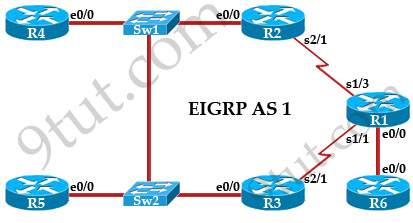
+ You can try the ICND2 – EIGRP Troubleshooting Simulator here.
+ You can try the ICND2 – OSPF Neighbor Simulator here.
+ You can try the new ICND2 – GRE Multilink Simulator here.
Note: You should complete all the above quizzes to have strong knowledge of each topic before taking the Composite Quizzes.
+ Composite Flash-based Quizzes to test your whole ICND1&2 knowledge. The 50 questions of Composite Quizzes are randomly taken from specific topic quizzes above. This helps you fully prepare for the ICND1&2 exams. You can find all the composite quizzes for ICND1 exam here and ICND2 exam here.
Also if you have any questions please feel free to comment here or send us an email to support@9tut.net.
Please do not share your account with other people, this would cause your account to be blocked.
Guideline to use the Simulator on 9tut.net
When you access a simulator (for example https://www.9tut.net/final_flash/ICND2/flash_simulator/EIGRP_Troubleshooting_Sim/EIGRP_Troubleshooting_Sim.html) you will see this interface:
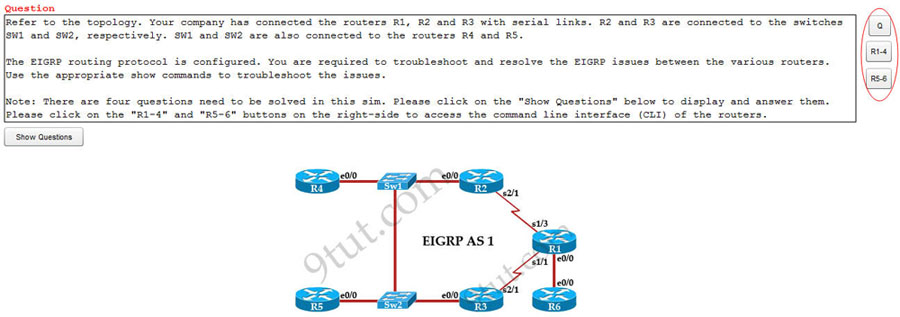
After entering the simulator, please have a look at the right-hand side. Do you see the 3 buttons? Please click on the three buttons on the right-hand side to access the CLI of each device.
Please have a look at the screenshot above:
– The first button (“Q”) represents the question (as the text you are reading).
– The second and third button (“R1-4” & “R5-6”) represents the Command Line Interface (CLI) of six routers from R1 to R6. After click “RT” button, you can type commands to the corresponding textboxes to get information about six routers as shown below
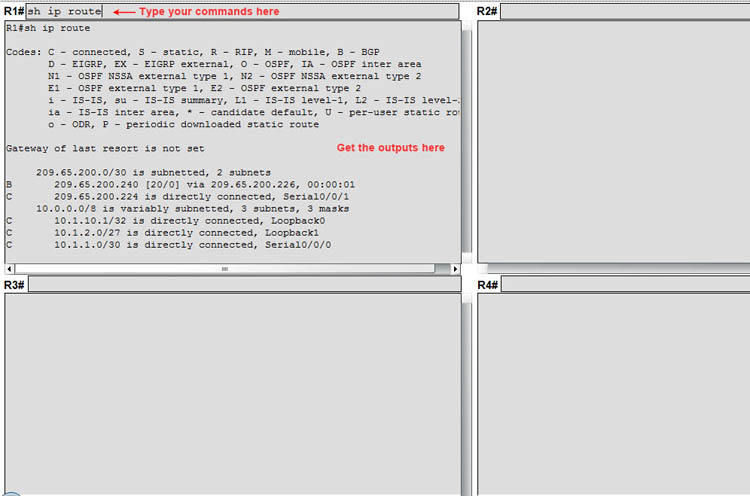
There is a “Show Questions” button at the left-hand side of the simulator. Please click on it to open the questions of that simulator.
Question
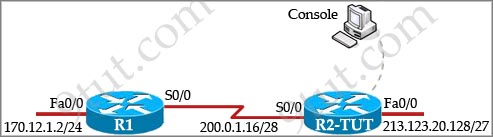
TUT Company recently installed a new router in their office. Complete the network installation by performing the initial router configurations and configuring RIPv2 routing using the router command line interface (CLI) on the R2-TUT.
Name of the router is R2-TUT
Enable-secret password is Sec@ret
The password to access user EXEC mode using the console is Sec@ret2
The password to allow telnet access to the router is Sec@ret3
IPV4 addresses must be configured as follows:
Ethernet network 213.123.20.128/27 – router has last assignable host address in subnet
Serial network is 200.0.1.16/28 – router has last assignable host address in the subnet. Interfaces should be enabled.
Router protocol is RIPv2
Answer and Explanation
READ MORE…
[am4show have=’p2;’]
Premium Member: You can practice this sim with our simulator via this link.
[/am4show]
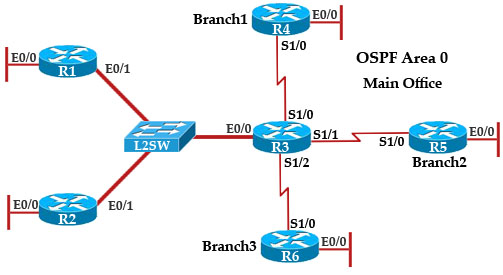
The topology below is running OSPF. You are required to troubleshoot and resolve the OSPF issues between the various routers. Use the appropriate show commands to troubleshoot the issues.
Topology:
READ MORE…
[am4show have=’p2;’]
Premium Member: You can try this sim with our simulator here.
[/am4show]
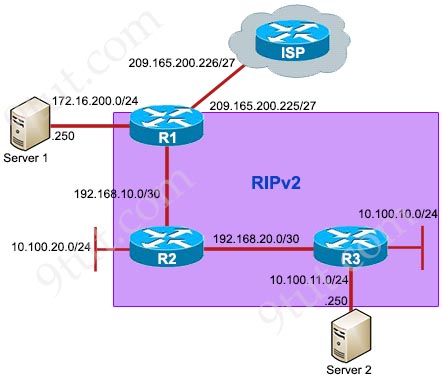
Refer to the topology below and answer the questions.
READ MORE…
Question
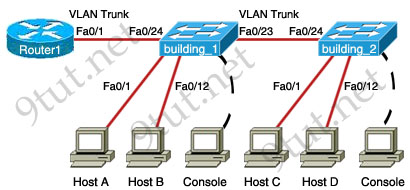
[am4show have=’p2;’]A new switch is being added to our LAN. Complete the following steps:
+ Configuring the building_2 switch with an IP address and default gateway.
+ Use the last available IP address on the management subnet for the switch host address.
+ In addition, the switch needs to be configured to be in the same VTP domain as the building_1 switch and also needs to be configured as a VTP client.
+ Assume that the IP configuration and VTP configuration on building_1 are complete and correct.
The configuration of the router is not accessible for this exercise. You must accomplish the following tasks:
Determine and configure the IP host address of the new switch.
Determine and configure the default gateway of the new switch.
Determine and configure the correct VTP domain name for the new switch.
Configure the new switch as a VTP client.
Note: You might be asked to use first, second… available IP address on the management subnet.[/am4show]
Answer and Explanation
READ MORE…
Question
A network associate is configuring a router for the TUT company to provide internet access. The ISP has provided the company six public IP addresses of 198.18.184.105 198.18.184.110. The company has 14 hosts that need to access the internet simultaneously. The hosts in the company LAN have been assigned private space addresses in the range of 192.168.100.17 – 192.168.100.30.
|
The following have already been configured on the router:
– The basic router configuration
– The appropriate interfaces have been configured for NAT inside and NAT outside
– The appropriate static routes have also been configured (since the company will be a stub network, no routing protocol will be required.)
– All passwords have been temporarily set to “cisco”
|
Tasks:
+ Use NAT to provide Internet access to all hosts in the company LAN.
+ Name the router TUT
+ Inside global addresses: 198.18.184.105 198.18.184.110/29
+ Inside local addresses: 192.168.100.17 – 192.168.100.30/28
+ Numer of inside hosts: 14
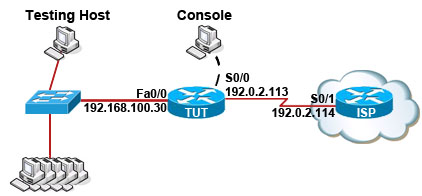
Solution:
READ MORE…
Question
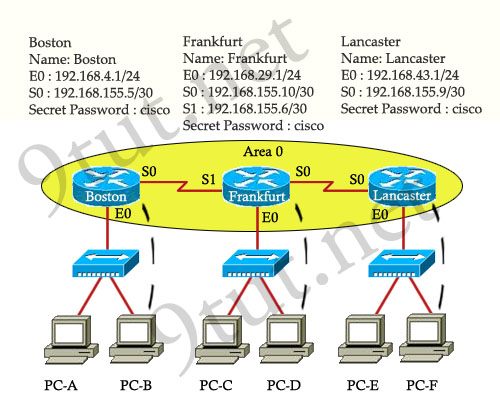
9tut.net company has decided to network three locations to improve efficiency in inventory control. The routers have been named to reflect the location: Boston, Frankfurt, Lancaster.
The necessary networking has been completed at each location, and the routers have been configured with single area OSPF as the routing protocol. The Boston router was recently installed but connectivity is not complete because of incomplete routing tables. Identify and correct any problem you see in the configuration.
Note: The OSPF process must be configured to allow interfaces in specific subnets to participate in the routing process.
You can download this lab and open with Packet Tracer here: https://www.9tut.net/download/OSPF_Sim_with_Solution.zip. Please say thanks to Renan who shared the files with us!
Answer and Explanation:
READ MORE…
[am4show have=’p2;’]
Premium Member: You can try this sim with our simulator here.
[/am4show]
This task requires the use of various show commands from the CLI of Router1 to answer 5 multiple-choice questions. This does not require any configuration.
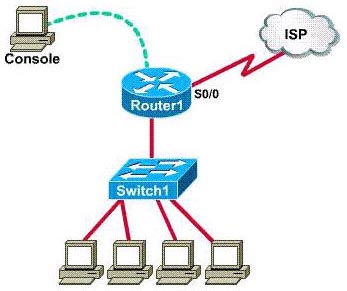
NOTE: The show running-configuration and the show startup-configuration commands have been disabled in this simulation.
To access the multiple-choice questions, click on the numbered boxes on the right of the top panel.
There are 5 multiple-choice questions with this task. Be sure to answer all 5 questions before leaving this item.
READ MORE…